 Binary Cipher
Capture.
Put every open commitment into one temporary inbox. Do not classify, beautify, or migrate anything.

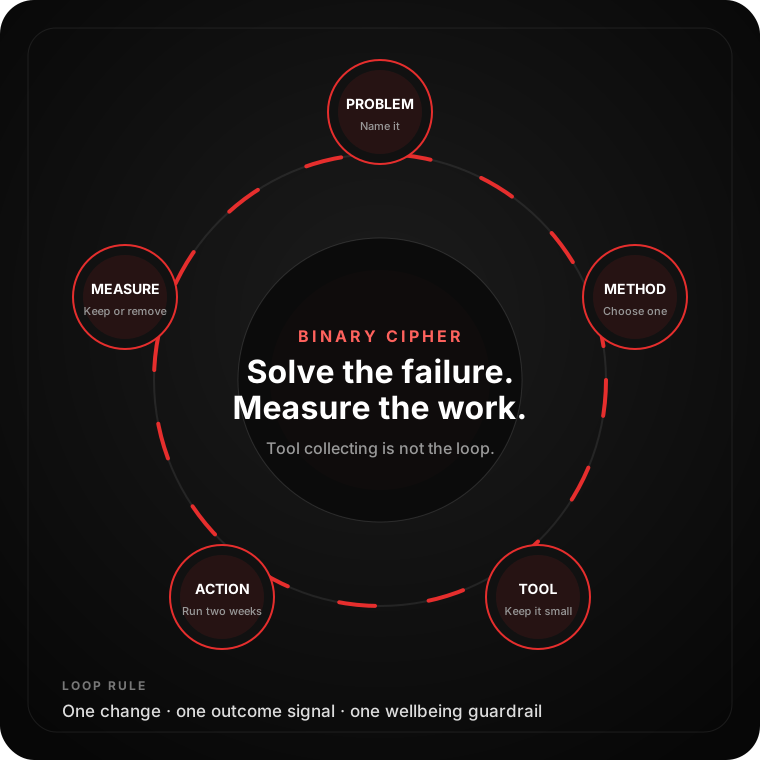
Choose the problem blocking your work. Get one well-supported method, the smallest useful tool stack, a 10-minute setup, and a metric that shows whether it helped. No “10×” promises and no app collecting.
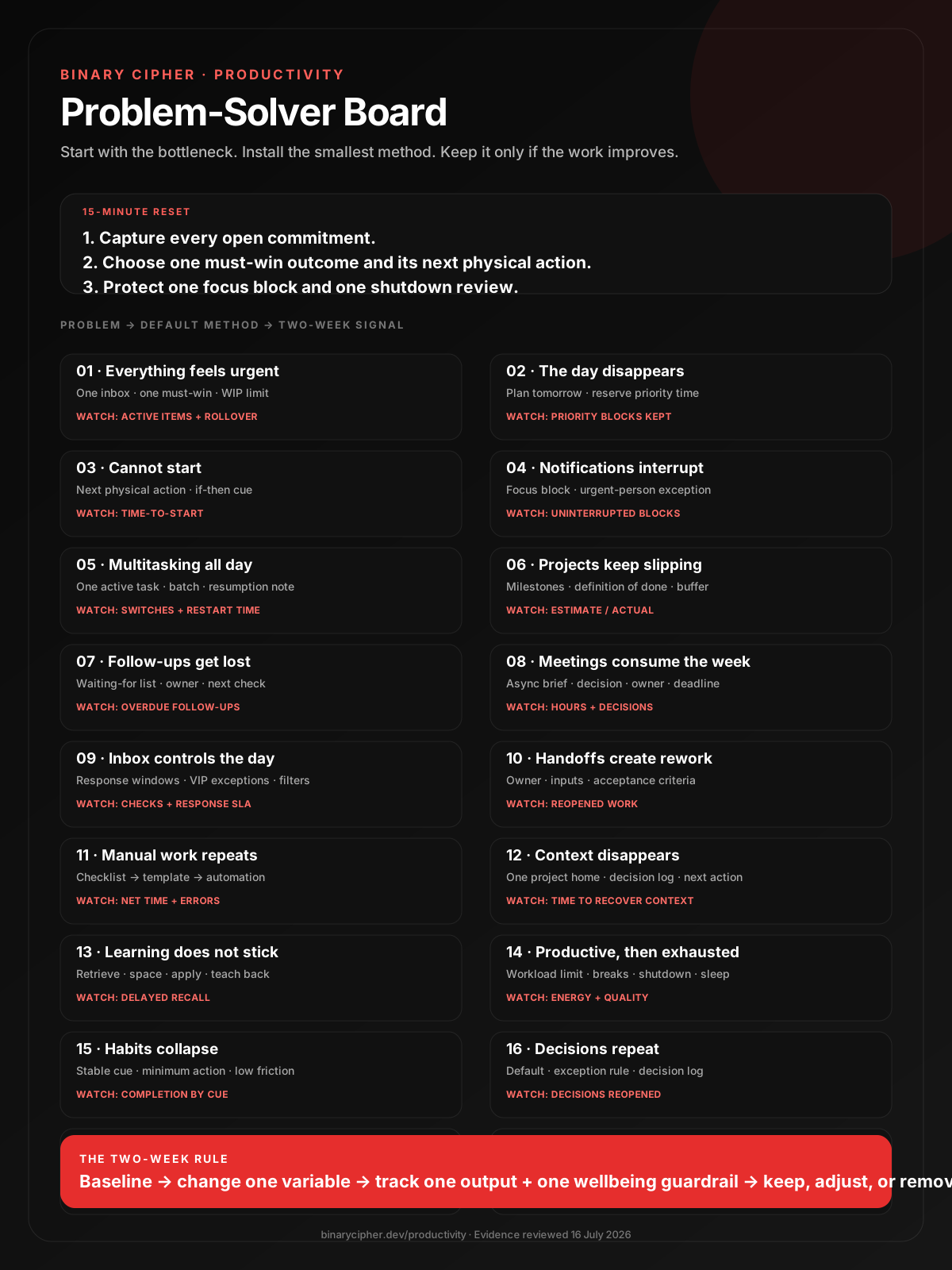
This reset is deliberately small. It creates one trusted view, one explicit priority, and one protected block—enough to reveal the real bottleneck.
Put every open commitment into one temporary inbox. Do not classify, beautify, or migrate anything.
Select one must-win outcome for the next workday and write the smallest physical action that starts it.
Reserve one focus block and one brief shutdown review. Define how urgent requests can still reach you.
Do not shop for software until you can name the failure your existing setup cannot solve.
Separate a priority problem from a focus, communication, workflow, knowledge, or capacity problem.
Start with a behaviour and a constraint. Add software only where it reduces friction or preserves shared state.
Keep the change when cycle time, focus, reliability, quality, or sustainable pace measurably improves.
Choose the strongest signal. The button opens the matching case family; start with one family even when several are true.
Open a case for the exact setup, best-fit tools, improvement mechanism, measurement signal, and a guardrail that prevents the method from becoming a new problem.
The list keeps growing, priorities change hourly, and important work is repeatedly carried forward.
Illustrative workflow—not a predicted result. Close and reopen this case to replay.
Less repeated reprioritization, fewer half-started tasks, and shorter time from start to finish.
Active items, weekly rollover, and average cycle time.
Do not build a complex scoring model when a direct priority conversation will resolve the conflict.
Messages, small requests, and meetings consume the best attention before the main deliverable moves.
Illustrative workflow—not a predicted result. Close and reopen this case to replay.
A scheduled cue turns a vague intention into a concrete commitment and exposes capacity conflicts early.
Best-fit toolsMore priority work begins on time and less high-value work is left for low-energy hours.
Priority blocks planned, blocks kept, and meaningful outputs completed.
A full calendar is not the goal. Leave buffer for genuine operational work and recovery.
The task stays broad, emotionally heavy, or ambiguous while easier work takes over.
Illustrative workflow—not a predicted result. Close and reopen this case to replay.
Shorter time-to-start and fewer days where the most important task never begins.
Minutes from planned start to actual start.
Do not use a timer to avoid clarifying a task that is genuinely underspecified or blocked.
Work is interrupted by alerts, badges, inbox checks, or the expectation of an immediate reply.
Illustrative workflow—not a predicted result. Close and reopen this case to replay.
Fewer external cues mean fewer forced task switches and less time rebuilding the working context.
Best-fit toolsLonger uninterrupted work periods and more complete thinking per session.
Uninterrupted blocks completed and unplanned interruptions per block.
Do not disappear without setting response expectations for clients or operational teams.
Many items are open, work is repeatedly resumed, and the day feels busy without enough finished output.
Illustrative workflow—not a predicted result. Close and reopen this case to replay.
More completed work, faster restarts, and less attention left on unfinished tasks.
Unplanned switches, work-in-progress count, and restart time.
Do not force single-tasking during genuine incident response; use a clear incident role and handoff instead.
Work is “almost done” for days, estimates move silently, and acceptance criteria appear late.
Illustrative workflow—not a predicted result. Close and reopen this case to replay.
Earlier risk detection, fewer surprise extensions, and more reliable commitments.
Estimate-to-actual ratio, blocked days, and milestone hit rate.
Do not convert uncertainty into a false single-date promise; use ranges and surface assumptions.
Commitments live in chat, inboxes, memory, or meeting notes until someone asks again.
Illustrative workflow—not a predicted result. Close and reopen this case to replay.
Externalizing commitments removes memory as the control system and makes stalled work visible.
Best-fit toolsFewer missed commitments and less time rediscovering who owes what.
Overdue follow-ups and average days waiting without a check-in.
Do not send automatic reminders without context or sensitivity to the relationship.
Status is repeated live, decisions remain vague, and the calendar fragments every focus window.
Illustrative workflow—not a predicted result. Close and reopen this case to replay.
Fewer meeting hours, clearer decisions, and larger blocks for delivery work.
Meeting hours, meetings without decisions, and decisions reopened.
Do not make sensitive, ambiguous, or relationship-heavy conversations async by default.
Inbox checking is continuous, response expectations are undefined, and every message feels equally urgent.
Illustrative workflow—not a predicted result. Close and reopen this case to replay.
Fewer reactive switches, lower inbox stress, and more predictable response handling.
Inbox checks, response SLA, and reactive switches per day.
Do not copy someone else's checking schedule if your role handles time-critical operations.
Work moves between people without complete inputs, acceptance criteria, or a clear decision owner.
Illustrative workflow—not a predicted result. Close and reopen this case to replay.
Fewer clarification loops, fewer reopened tasks, and faster movement between stages.
Reopened work, clarification messages, and handoff wait time.
Do not hide shared responsibility behind a single owner; ownership clarifies coordination, not blame.
The same data is copied, the same files are created, or the same sequence is reconstructed every week.
Illustrative workflow—not a predicted result. Close and reopen this case to replay.
Lower handling time, fewer omissions, and more consistent repeat work.
Minutes per run, error count, automation failures, and monthly runs.
Do not automate a broken, rare, or high-judgment process merely because a connector exists.
Context is scattered across documents and chats, so every restart begins with a search or a meeting.
Illustrative workflow—not a predicted result. Close and reopen this case to replay.
Faster restarts, fewer duplicate discussions, and more durable handoffs.
Time to recover context and repeated questions already answered.
Do not create a second source of truth; link to the system that actually owns the data.
Courses and notes feel familiar, but the knowledge cannot be recalled or applied when needed.
Illustrative workflow—not a predicted result. Close and reopen this case to replay.
More durable recall and faster transfer from study to real work.
Delayed recall, practice accuracy, and successful real-world application.
Do not turn every sentence into a flashcard; prioritize concepts and decisions you need to retrieve.
Output is achieved by extending hours, skipping recovery, and borrowing energy from the next week.
Illustrative workflow—not a predicted result. Close and reopen this case to replay.
Sleep and recovery support attention, memory, judgment, and the ability to sustain performance.
Best-fit toolsMore consistent output, fewer fatigue-driven errors, and less recovery debt.
Work hours, sleep duration, subjective energy, and quality defects.
A personal routine cannot fix structurally unsafe workload or burnout; escalate workload and seek appropriate support.
The behaviour depends on motivation, the cue changes, or the desired action is too large for a difficult day.
Illustrative workflow—not a predicted result. Close and reopen this case to replay.
Specific implementation intentions help translate a strong goal into action when the cue appears.
Best-fit toolsMore reliable follow-through with less dependence on momentary motivation.
Completion rate when the chosen cue occurs.
Do not preserve a streak when the behaviour no longer serves a meaningful goal.
The same low-risk choices are discussed repeatedly and past reasoning is hard to recover.
Illustrative workflow—not a predicted result. Close and reopen this case to replay.
Defaults remove repeat deliberation while exception rules preserve judgment where it matters.
Best-fit toolsFaster routine decisions and fewer debates that reopen without new evidence.
Decisions reopened, time-to-decision, and exception rate.
Do not turn guidelines into bureaucracy; defaults should be easy to override with a stated reason.
More time is spent tagging, migrating, styling, and syncing than completing the outcomes the system exists to support.
Illustrative workflow—not a predicted result. Close and reopen this case to replay.
A smaller system reduces tool switching, reconciliation, and the temptation to optimize appearances over output.
Best-fit toolsLess administrative drag and a clearer path from capture to completed work.
Minutes per week maintaining the system and duplicate items found.
Do not migrate tools during a critical delivery period unless the current system is actively failing.
Drafts arrive quickly, but factual errors, missing context, privacy risk, or inconsistent quality create hidden rework.
Illustrative workflow—not a predicted result. Close and reopen this case to replay.
Faster first passes on suitable work while preserving accountability for the final result.
Human time saved, defects found in review, and rework after release.
Do not send confidential data to an unapproved service or delegate consequential judgment without accountable review.
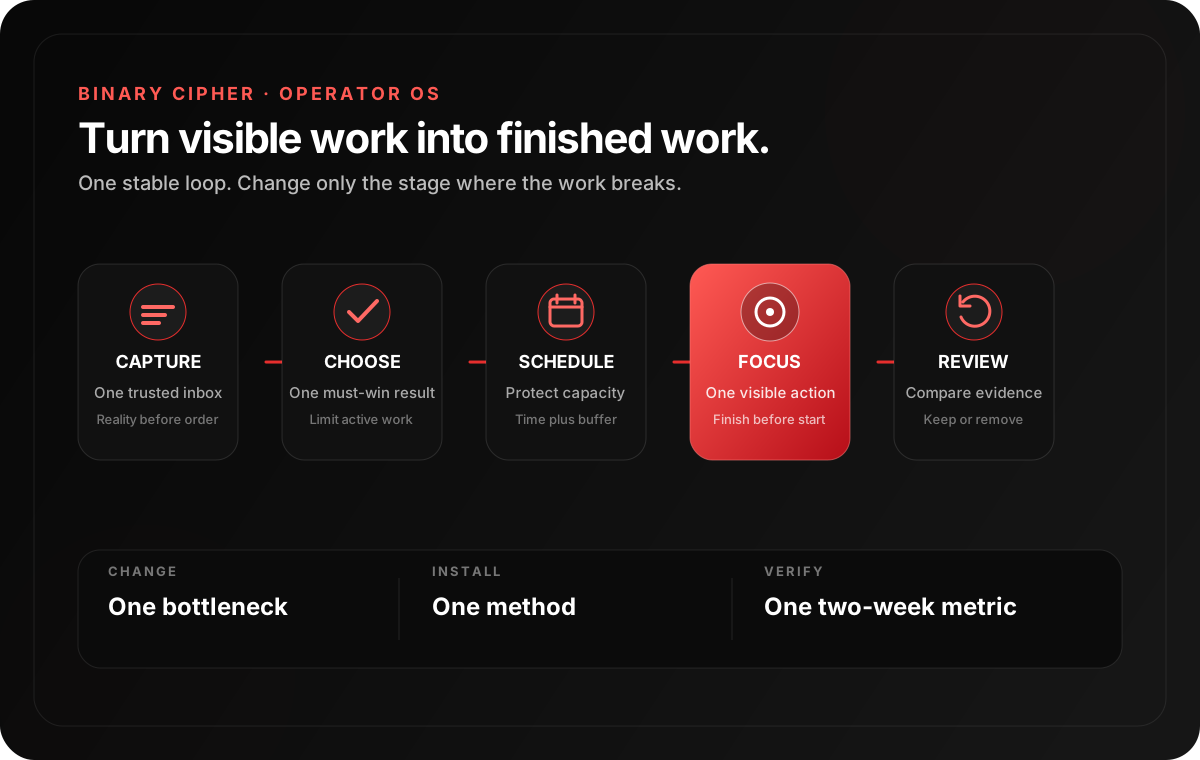
The method changes by bottleneck, but the control loop stays stable: capture reality, choose deliberately, protect capacity, execute visibly, and review evidence.
Find the stage where work currently breaks. Install one change there, then observe the downstream result for two weeks.
Collect commitments, requests, and waiting items into one trusted intake.
Select the must-win outcome, limit work in progress, and expose the trade-off.
Reserve time, define communication exceptions, and leave realistic buffer.
Keep one active action, finish to a clear definition of done, and record handoffs.
Compare intended and actual work, update waiting items, and keep only useful system elements.
This is a scenario, not a promised percentage. The win is moving from invisible overload to explicit flow and measuring what changes.
Three client projects, meetings, chat requests, and overdue documentation move into one visible intake.
The consultant selects the delivery at greatest risk, defines done, and parks lower-value work.
Two architecture blocks are protected; status meetings become written updates with an urgency exception.
The weekly review checks completed focus blocks, meeting hours, overdue commitments, reopened work, and estimate accuracy.
This is a selection map, not a shopping list. Start with software you already have, choose one primary tool per job, and verify current pricing, platform support, privacy, and data-export needs before adopting it.
No named app is “scientifically proven” to make everyone productive. Research supports methods and mechanisms; the app is only an implementation aid whose value must be tested in context.
Fast individual capture, next actions, and recurring work.
Suite default Microsoft To DoA strong low-friction choice inside Microsoft 365.
Technical teams LinearTechnical teams managing issues, cycles, projects, and delivery flow.
Cross-functional AsanaCross-functional projects with owners, milestones, and dependencies.
Visual workflow TrelloSimple visual flow when a board and explicit WIP are enough.
Code delivery GitHub IssuesEngineering work that should stay close to repositories and pull requests.
Time blocks, shared availability, and protected work windows.
Calendar Outlook CalendarTime protection and scheduling inside Microsoft 365.
Distraction blocker FreedomCross-device website and app blocking for recurring distraction patterns.
Strict blocker Cold TurkeyStrict desktop blocking when easy overrides defeat softer controls.
Accountability FocusmateScheduled accountability when starting alone is the main bottleneck.
Filters, templates, scheduled send, and batched email handling.
Email OutlookRules, categories, templates, and integrated Microsoft scheduling.
Team communication SlackTeam chat with channel conventions, notification schedules, and async updates.
Team communication Microsoft TeamsCommunication and meetings for teams standardized on Microsoft 365.
Async video LoomShort recorded walkthroughs that replace status or demonstration meetings.
Project homes, lightweight databases, decisions, and collaborative docs.
Personal knowledge ObsidianLocal-first linked notes and durable personal technical knowledge.
Team knowledge ConfluenceStructured team documentation in Atlassian-centered environments.
Spaced practice AnkiFlexible spaced retrieval for facts, concepts, and technical recall.
Learning workspace RemNoteNotes and spaced retrieval in one learning-oriented workspace.
Straightforward event-to-action automations across common business apps.
Workflow automation MakeVisual multi-step workflows that need branching and transformation.
AI assistant ChatGPTBounded drafting, analysis, transformation, and coding with human review.
AI assistant ClaudeSource-grounded reading, drafting, analysis, and coding with human review.
Pick one leading signal and one outcome signal. Capture a rough baseline, run the change for two normal weeks, and decide whether the system earned its cost.
Also watch unplanned switches and restart time. Hours at a desk are not the result.
Track how long work takes after it starts and how many items compete for attention.
Use missed commitments, clarification loops, and estimate-to-actual ratio to find weak interfaces.
Watch work hours, sleep, fatigue, and defects together so output is not borrowed from next week.
Keep the change if the target outcome improves without unacceptable cost. Adjust it if the method is sound but the constraint is wrong. Remove it if maintenance rises and the work does not improve.
The sources below support methods such as implementation intentions, lower switching, batched email, WIP control, checklists, retrieval practice, bounded AI assistance, and recovery. They do not prove that a named app works for every person. Last evidence review: 16 July 2026.
Experimental evidence that a brief weekly plan can reduce unfinished tasks and related rumination; it did not improve every work outcome.
Meta-analysis Implementation intentions and goal achievementMeta-analytic foundation for specific if-then plans that connect a strong intention to a situational cue.
Meta-analysis Progress monitoring and goal attainmentA meta-analysis of randomized studies finding that monitoring progress improves goal attainment, especially when results are recorded or reported.
Peer-reviewed experiments Attention residue when switching work tasksExperiments showing that attention can remain on unfinished work and impair performance after a switch.
Peer-reviewed research Executive control in task switchingFoundational task-switching research describing the cognitive processes involved in changing task rules and goals.
Meta-analysis Interventions that reduce interruption costsA meta-analysis finding that interruption-management interventions can improve primary-task accuracy and reduce resumption lag.
Randomized field study Notification batching in the fieldA randomized field study supporting batched notifications with important-person exceptions rather than indiscriminate removal.
Controlled experiment Checking email less frequently reduces stressA within-person experiment supporting less frequent email checking, with role and service-level caveats.
Field experiment Partial website blocking and work focusA field experiment finding benefits from partial scheduled blocking while complete blocking could backfire.
Operational standard Open Guide to KanbanAn open operational guide to workflow, work-in-progress control, flow metrics, and improvement.
Multicentre study A surgical safety checklist to reduce harmHigh-stakes evidence that well-designed checklists can improve communication and consistency; workplace use still requires local adaptation.
Peer-reviewed experiment Retrieval practice produces more learningExperimental evidence that active retrieval can outperform elaborative rereading for meaningful learning.
Longitudinal study How habits form in the real worldA longitudinal study showing wide variation in habit-formation time and no universal 21-day rule.
Meta-analysis Micro-breaks, fatigue, and performanceA meta-analysis finding reduced fatigue and increased vigor, while the overall performance effect was small and not conclusive.
Field study Generative AI at WorkField evidence of productivity gains in one bounded customer-support setting, with large differences by worker experience and task fit.
Health guidance NIOSH guidance on sleep and work performanceAuthoritative guidance connecting adequate sleep with health, safety, thinking, and work performance.
There is no universal recovery time after an interruption, perfect focus interval, 21-day habit law, or guaranteed “10×” app.
A bottleneck constrains the result. WIP is started-but-unfinished work. Feedback is the measurement that tells you whether a change helped.
Only add complexity after a stable process exists and a clear result justifies the maintenance.