 Binary Cipher



Adobe Journey Optimizer (AJO) leverages dataset lookup capabilities to enhance personalization and customer journey orchestration.
Here’s how dataset lookup functions within AJO:
Dataset Lookup in AJO:
- Purpose and Functionality:
- Dataset lookup in AJO allows for the personalization of content by accessing data from Adobe Experience Platform datasets. This is particularly useful for tailoring messages or actions based on specific customer data points.
- Setup and Configuration:
- To use dataset lookup for personalization, you must first enable specific datasets through an API call. This involves ensuring that the dataset does not exceed size restrictions (5GB for production, 1GB for dev sandbox) and adheres to the limit of 50 datasets per organization for lookup personalization.
- The schema of the dataset must include a primary identity that can serve as a lookup key.
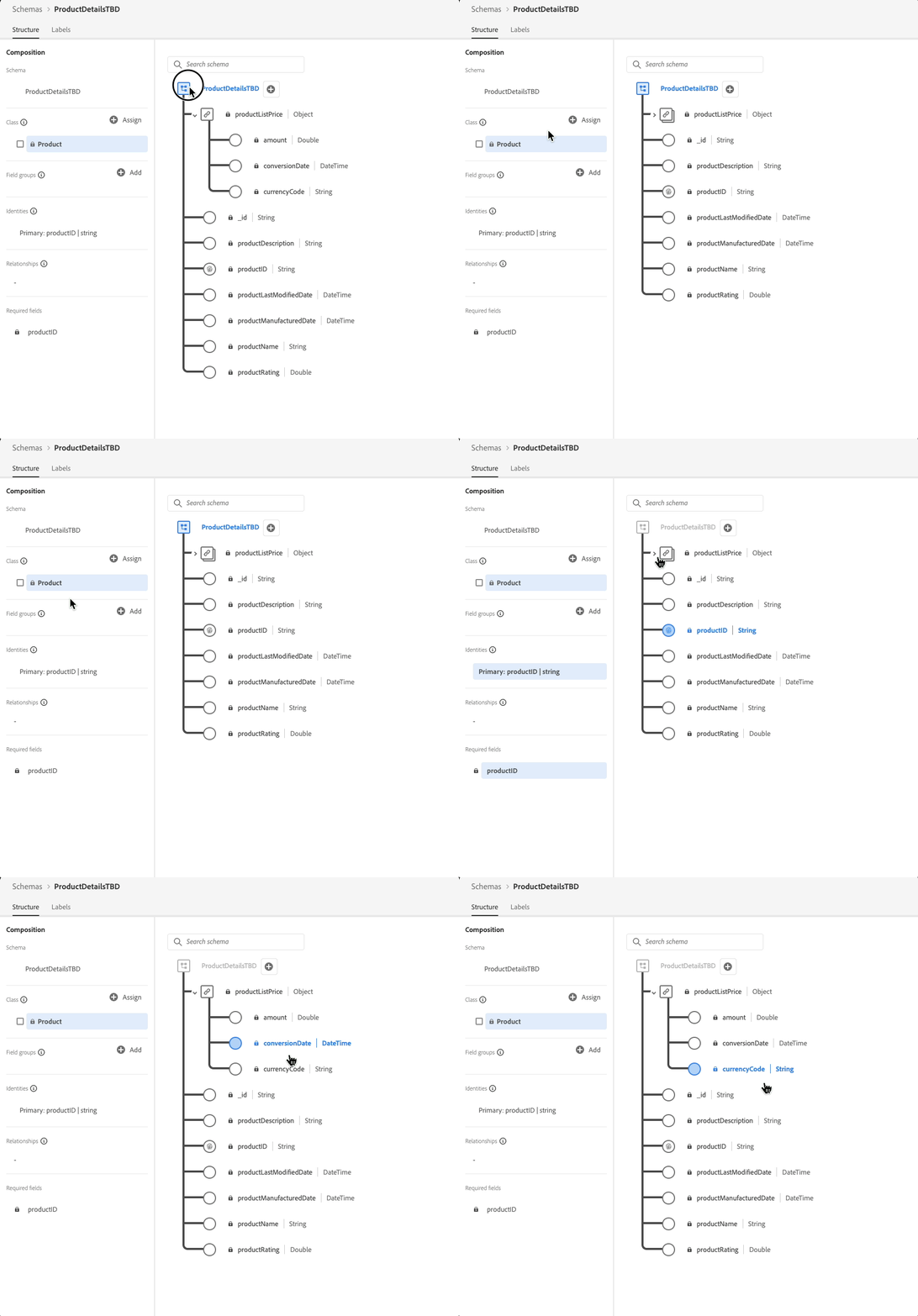
Enable a dataset for data lookup
In order to leverage data from your dataset for personalization, you need to use an API call to retrieve its status and enable lookup service.

- Usage in Personalization:
- After enabling datasets for lookup, you can use the datasetLookup helper function within AJO’s personalization editor. This function allows you to pull specific fields from the dataset based on a matching ID, enhancing content personalization in messages or campaigns.
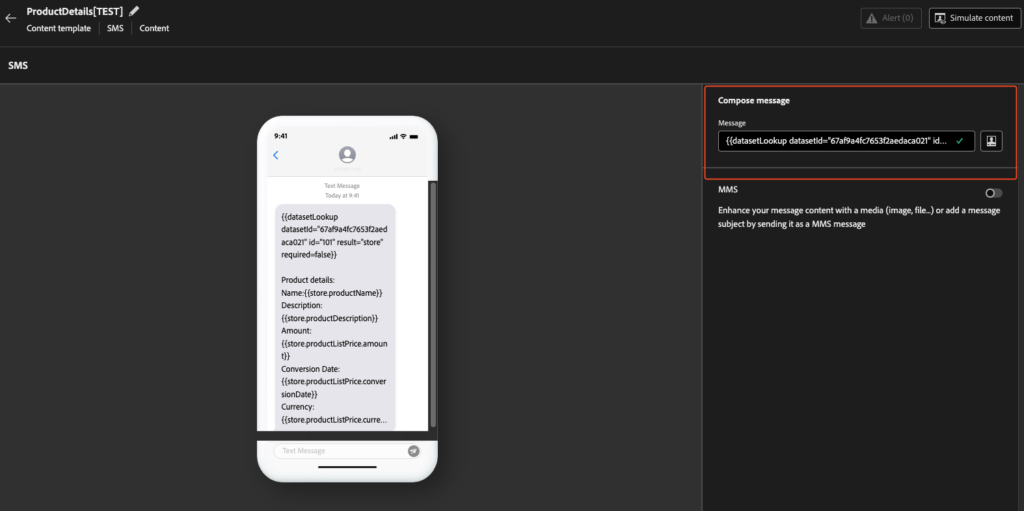
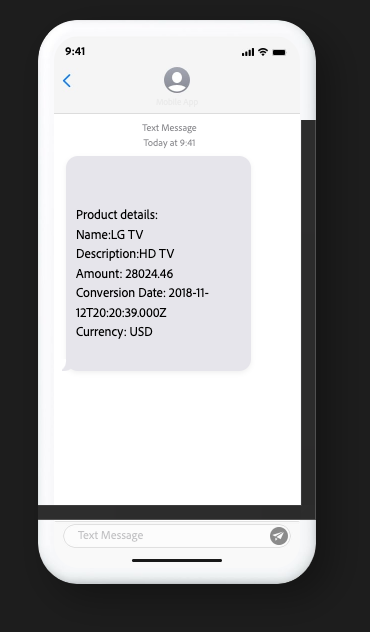
{{datasetLookup datasetId="1234567890" id="101" result="store" required=false}}Product details:
Name:{{store.productName}}
Description:{{store.productDescription}}
Amount: {{store.productListPrice.amount}}
Conversion Date: {{store.productListPrice.conversionDate}}
Currency: {{store.productListPrice.currencyCode}}

- Limitations and Considerations:
- Not all datasets can be used for real-time personalization; only those specifically enabled for lookup can be utilized.
- Data usage labeling and enforcement are not currently applied to datasets used for lookup, but there are restrictions on dataset size and number of records.
- Data Management:
- AJO offers control over data lifecycle management, including the ability to delete or archive data based on organizational policies or regulatory needs. This ensures that data used in journeys or for personalization adheres to data protection standards.
- Integration with Other Adobe Tools:
- AJO’s dataset lookup capability integrates with Adobe Experience Platform, allowing for a unified view of customer data across different touchpoints and channels. This integration is crucial for maintaining consistency and relevance in customer interactions.
- Error Handling:
- If there are issues with API calls to enable datasets for lookup, it might be necessary to adjust permissions or reconfigure API connections within the developer console.
it’s working fine for Email templates, SMS but throwing error as follows for the content fragments
Here are some other errors from community : https://experienceleaguecommunities.adobe.com/t5/journey-optimizer-questions/dataset-lookup-in-ajo-not-working/m-p/725985
This functionality within AJO underscores Adobe’s commitment to providing marketers with tools to create highly personalized, data-driven customer experiences while managing data responsibly.
Here are some key use cases where dataset lookup in Adobe Experience Platform (AEP) and Adobe Journey Optimizer (AJO) can be particularly leveraged:
Personalization of Marketing Communications:
- Tailored Messaging: Use customer data from datasets to personalize email, SMS, or push notifications with specific user names, preferences, or past interactions. For instance, recommending products based on previous purchases or browsing history.
- Dynamic Content: Adjust content in real-time based on the customer’s current engagement level or recent activities. This could mean changing the call-to-action or promotional offers within an email campaign.
Customer Journey Orchestration:
- Segmentation and Triggering: Trigger specific journey steps or campaigns when a customer’s data matches certain criteria in the dataset. For example, if a customer’s cart abandonment is detected, an automated follow-up could be triggered.
- Next Best Action: Use historical and real-time data to determine and execute the next best action for each customer, enhancing the customer experience by offering timely and relevant interactions.
Real-Time Decision Making:
- Offers and Discounts: Apply real-time discounting or offer customization based on customer’s current behavior or profile data. If a customer frequently buys items from a specific category, they could receive targeted offers for those products.
- Support and Service: Enhance customer support by providing agents with real-time customer data, enabling personalized service recommendations or resolving issues more efficiently.
Data-Driven Insights:
- Behavioral Analysis: Use lookup to pull detailed customer behavior data to analyze trends, which can then inform broader marketing strategies or product development.
- Churn Prediction: Monitor datasets for signs of customer disengagement or dissatisfaction, using this data to proactively engage with at-risk customers to prevent churn.
Compliance and Data Management:
- Data Privacy: Ensure communications comply with privacy regulations by checking data permissions or consent status before sending personalized content.
- Data Lifecycle Management: Use dataset lookups to manage data lifecycle, ensuring that outdated or unnecessary data is archived or deleted in compliance with data retention policies.
Cross-Channel Consistency:
- Unified Customer Experience: Ensure that the customer receives a consistent message and experience across different channels by leveraging centralized datasets for all touchpoints.
Testing and Optimization:
- A/B Testing: Use dataset lookup to segment users for A/B testing, where different groups receive variations of content based on specific data attributes to optimize campaign performance.
- Real-Time Feedback: Adjust marketing strategies on-the-fly based on immediate feedback or interaction data from the dataset.
These use cases demonstrate how dataset lookup in AEP/AJO can be a powerful tool for enhancing customer engagement, improving operational efficiency, and ensuring data-driven decision-making across various aspects of marketing and customer relationship management.
Koti Syamala
Adobe Martech Architect · 8+ years on the Experience Cloud stack · AEM, AJO, AEP, Campaign
Enjoying this? I publish weekly Adobe Martech implementation guides.