 Binary Cipher

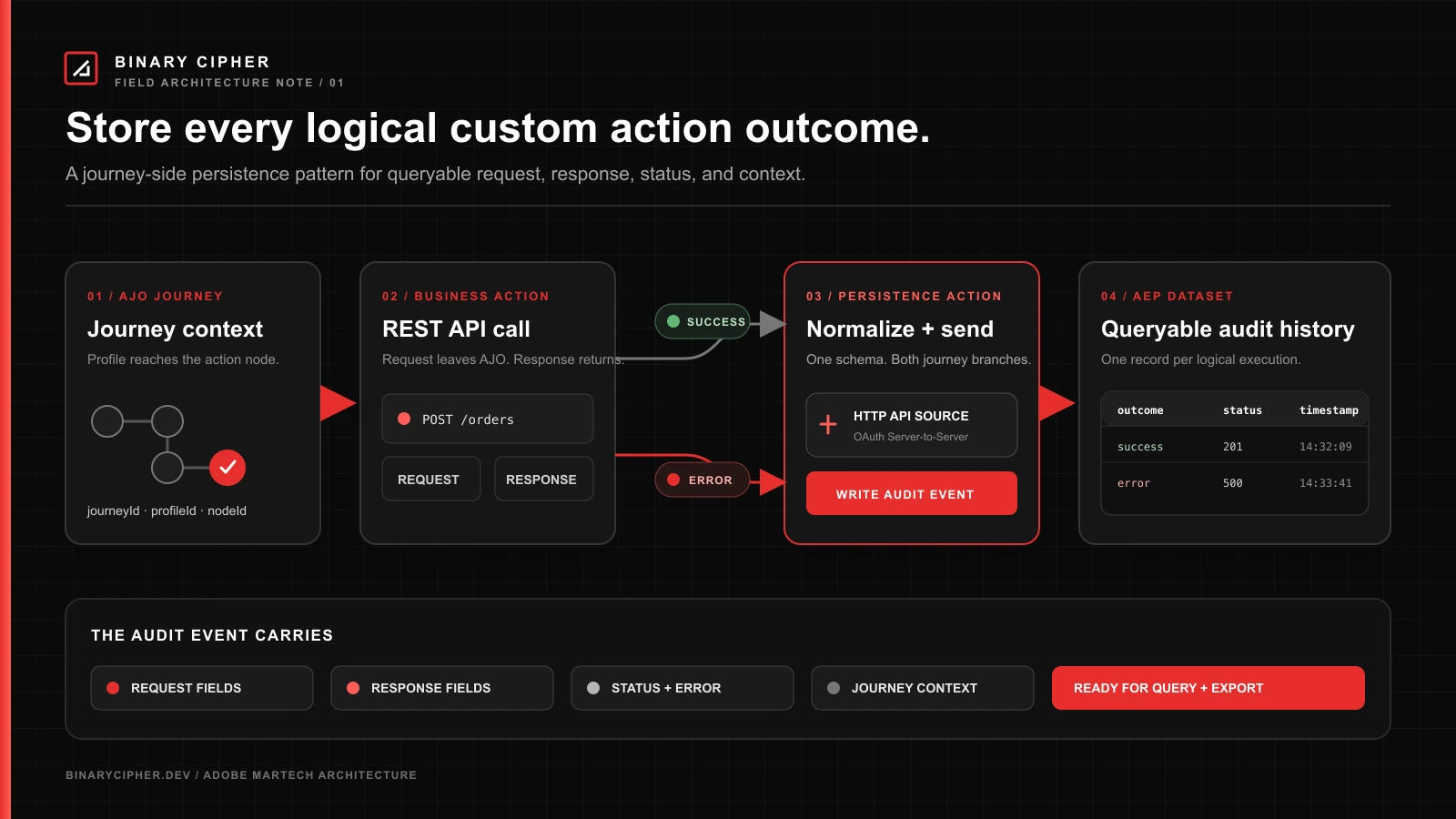
Adobe Journey Optimizer custom actions make it possible to call almost any REST endpoint from a journey. That flexibility creates an operational question that usually appears shortly after the first production implementation:
Where can we see the actual request and response data for every custom action call?
Journey Optimizer already generates Journey Step Events for custom action executions. Those events are valuable for monitoring because they contain the journey, profile, node, endpoint, timing, status, and error details. They do not, however, provide a documented production dataset containing the complete business request and response payload for every call.
If you need that business-level history inside Adobe Experience Platform, the practical Adobe-native pattern is to add a reusable persistence custom action. After the business custom action finishes, the persistence action sends a structured audit event to an authenticated AEP HTTP API source. The source writes the event into a dedicated ExperienceEvent dataset.
The resulting design gives you one queryable dataset record for each logical custom action execution.
                                   +--> Success --> Persist call record to AEP
Journey --> Business custom action |
                                   +--> Error ----> Persist call record to AEP
                                                        |
                                                        v
                                             Custom action audit dataset
This article explains how to design and build that pattern, what information to store, how to test it, and where its reliability boundary sits.
The short answer
There are two separate data needs, and they should not be confused.
| Requirement | Recommended source |
|---|---|
| Journey and node progression | Native Journey Step Events |
| Custom action endpoint, method, latency, status and error | Native Journey Step Events |
| Business request fields sent to the external API | Custom audit dataset |
| Business response fields returned by the external API | Custom audit dataset |
| One record for the final logical action outcome | Custom audit dataset |
| Every physical retry attempt at the network layer | Receiving API or API gateway logs |
Use Journey Step Events for operational truth about what AJO executed. Use the custom audit dataset for the business data you intentionally choose to retain.
Adobe documents the underlying pattern in its guide for writing custom journey events into AEP with custom actions. The implementation uses an authenticated AEP HTTP API source and an AJO custom action configured with OAuth Server-to-Server authentication.
What AJO stores automatically
Journey Step Events are system-generated XDM events created as profiles move through a journey. They are enabled by default and written into Adobe Experience Platform. Adobe describes these system datasets as read-only: you can query them, but you cannot extend their schema to add your own request or response objects.
For custom actions, the documented execution fields include information such as:
- action ID, name, and type;
- endpoint and HTTP method;
- execution start time and duration;
- endpoint response latency;
- throttling and queue wait time;
- HTTP, timeout, capping, and internal errors;
- journey version, node, profile, and instance context.
See Adobe’s Journey Step Events overview and action execution field reference for the maintained field list.
This gives you answers to questions such as:
- Did the profile reach the custom action?
- Which endpoint did AJO call?
- Did the final logical execution succeed?
- Was it capped, timed out, or rejected with an HTTP error?
- How long did the call take?
It does not give you a documented, general-purpose production field containing the fully rendered outbound request body and returned response body.
That missing business payload is what the custom audit dataset supplies.
Define what “every call” means before you build
The phrase “store every API call” can describe two different requirements.
Logical action execution
A profile reaches a custom action node. AJO attempts to execute it and eventually produces a success, error, timeout, or capping outcome. The persistence pattern in this article creates one audit record for that final logical outcome.
Physical HTTP attempt
AJO can retry certain failed requests. One logical custom action execution may therefore create multiple HTTP attempts against the endpoint. Adobe’s action execution documentation notes that several origin timing fields describe the final retry attempt.
The journey cannot reliably create a separate dataset record for each hidden retry attempt because those attempts are not individually exposed as downstream journey activities.
If the requirement is packet-level or attempt-level evidence, capture it at the receiving API, an API gateway, or a logging proxy. Do not describe a journey-side audit dataset as a complete network log.
For most reconciliation, support, and business audit use cases, one record per logical execution is the useful starting point.
Target architecture
The architecture has five components.
- Business custom action – Calls the CRM, order platform, loyalty service, messaging provider, or other external API.
- Configured success and failure responses – Make relevant returned fields and
jo_status_codeavailable to downstream journey activities. - Persistence custom action – Sends an audit event to AEP.
- Authenticated HTTP API source – Receives the event and streams it to the selected dataset.
- Custom ExperienceEvent dataset – Stores the request, response, status, and journey context for later queries or export.
+--------------------------+
| Adobe Journey Optimizer  |
|                          |
|  Business custom action  |
|       |                  |
|       +-- success -------+----> StoreCustomActionCall
|       |                  |                |
|       +-- error/timeout -+----> StoreCustomActionCall
+--------------------------+                |
                                            v
                              +---------------------------+
                              | Authenticated AEP HTTP API|
                              | source / collection URL   |
                              +---------------------------+
                                            |
                                            v
                              +---------------------------+
                              | Custom action audit       |
                              | ExperienceEvent dataset   |
                              +---------------------------+
The persistence action is sequential. AJO does not execute the business action and persistence action in parallel. This matters when you estimate the additional latency and when you review package-specific journey limitations.
Prerequisites
Complete the POC in a development sandbox first. You will need:
- permission to create or manage AJO custom actions;
- permission to create AEP schemas, datasets, and source dataflows;
- an Adobe Developer Console project with OAuth Server-to-Server credentials;
- the required AEP developer and API access-control permissions;
- one business custom action or mock endpoint with predictable success and error responses;
- a stable identity or correlation value for each business transaction;
- Query Service access for validation.
Do not begin with every journey. Prove the pattern with one action and three controlled outcomes: success, HTTP failure, and timeout.
Step 1: Design the audit event before configuring AJO
Start with the questions the dataset must answer. A useful audit record normally needs four groups of data.
Execution identity
- audit event
_id; - correlation ID or business transaction ID;
- event timestamp;
- environment or sandbox;
- normalized outcome.
Journey context
- journey ID;
- journey version ID;
- journey name, if useful;
- node ID or a stable node label;
- custom action name;
- profile or business identity.
Request evidence
- selected identifiers and business fields sent to the external endpoint;
- the values after any important transformation;
- no authentication secrets or prohibited fields.
Response evidence
- selected success-response fields;
- selected failure-response fields;
jo_status_code;- a normalized business outcome.
A sensible common envelope looks like this:
| Field | Type | Purpose |
|---|---|---|
_id | string | Unique audit event ID |
timestamp | date-time | Event creation time |
eventType | string | Custom action audit event category |
callId | string | Unique logical action execution ID |
correlationId | string | Order, case, event, or transaction ID |
journeyVersionId | string | Exact journey version |
nodeId | string | Business action node or stable node key |
actionName | string | Logical custom action name |
profileId | string | Profile or business identity |
request | object | Selected outbound business fields |
response | object | Selected success fields |
error | object | Selected failure fields |
joStatusCode | string | AJO status such as http_200 or timedout |
outcome | string | Normalized success, error, timeout, capped, internalError |
Structured fields or a raw JSON string?
Structured request and response objects are easier to query, govern, label, and aggregate. They also require stable schemas and explicit mappings.
A raw JSON string is easier when many actions return unrelated payloads, but every analysis begins with parsing text. Governance is also harder because sensitive values can hide inside the string.
For a production implementation, use a stable common envelope plus small action-specific nested objects. Store only the fields the team will actually use. Do not turn the dataset into an uncontrolled copy of every payload.
Step 2: Create the XDM schema and dataset
Create a new schema based on the XDM ExperienceEvent class. Add a tenant-specific field group containing the custom action audit object.
The event should contain the standard ExperienceEvent fields required by your implementation, including:
_id;timestamp;eventType;producedBywhere appropriate;- the tenant-namespaced custom audit object.
Use a clear name, for example:
- Schema:
AJO Custom Action Audit Event Schema - Dataset:
AJO Custom Action Audit Events - HTTP source:
AJO Custom Action Audit Inlet
Keep the dataset out of Profile by default
The purpose of this dataset is operational evidence and later export, not profile activation. Do not enable the schema or dataset for Real-Time Customer Profile unless the team has a separate, reviewed use case that requires it.
Profile enablement has lasting schema and identity implications. An audit dataset can also create unnecessary profile volume and expose operational fields to downstream segmentation.
Step 3: Create an authenticated HTTP API source
In Adobe Experience Platform:
- Open Connections > Sources.
- Select the HTTP API source.
- Create a new account.
- Enable authentication.
- Select the audit dataset created in the previous step.
- Complete the dataflow.
- Open the new dataflow and copy its collection URL and sample schema payload.
Adobe’s HTTP API connector documentation explains the current source setup options. Adobe also advises waiting briefly after creating or updating a streaming dataflow before sending production-like tests; use the source monitoring view to confirm that the dataflow is ready.
The collection endpoint will resemble:
https://dcs.adobedc.net/collection/<collection_id>?syncValidation=false
Do not reconstruct the source payload from memory. Copy the payload generated by the dataflow and replace only the sample xdmEntity values with your schema fields.
Step 4: Configure OAuth Server-to-Server access
The AJO persistence action must authenticate to the AEP HTTP source.
In Adobe Developer Console:
- Open or create the project used for the integration.
- Add OAuth Server-to-Server credentials.
- Add the required Adobe Experience Platform APIs.
- Grant the corresponding product-profile and API permissions.
- Obtain the client ID, client secret, scope, and token endpoint details.
The persistence custom action will use AJO custom authentication to obtain a bearer token and cache it for the configured duration.
Conceptually, the authentication configuration looks like this:
{
  "type": "customAuthorization",
  "authorizationType": "Bearer",
  "endpoint": "https://ims-na1.adobelogin.com/ims/token/v3",
  "method": "POST",
  "headers": {},
  "body": {
    "bodyType": "form",
    "bodyParams": {
      "grant_type": "client_credentials",
      "client_secret": "<managed-secret>",
      "client_id": "<client-id>",
      "scope": "<approved-scopes>"
    }
  },
  "tokenInResponse": "json://access_token",
  "cacheDuration": {
    "duration": 28000,
    "timeUnit": "seconds"
  }
}
Use the values supplied for your project rather than copying scopes from a tutorial unchanged. Grant the smallest permission set that works. AJO encrypts secrets defined in custom action authentication and masks them in the interface, but the team still needs normal credential ownership, rotation, and access-review procedures.
Adobe’s custom authentication behavior is described in the external data source and authentication documentation.
Step 5: Create the reusable persistence custom action
In Journey Optimizer, create a new custom action named something recognizable, such as:
StoreCustomActionCall
Configure it with:
- Method:
POST - URL: the authenticated AEP HTTP API collection endpoint
- Content type: JSON
- Required source headers, including the sandbox value documented by the generated source payload
- Custom authentication: the OAuth Server-to-Server configuration
- Request schema: the
xdmMetaandxdmEntitystructure copied from the HTTP source
Adobe’s AJO-to-AEP use case calls out Content-Type, Charset, and sandbox-name as required headers for this pattern. Confirm the exact generated values in your environment.
A simplified request shape is shown below. Replace _yourTenant with your actual tenant namespace and use the schema reference generated by AEP.
{
  "xdmMeta": {
    "schemaRef": {
      "id": "https://ns.adobe.com/<tenant>/schemas/<schema-id>",
      "contentType": "application/vnd.adobe.xed-full+json;version=1.0"
    }
  },
  "xdmEntity": {
    "_id": "sample-call-id",
    "eventType": "journey.customAction.audit",
    "producedBy": "self",
    "timestamp": "2026-07-31T14:30:00Z",
    "_yourTenant": {
      "customActionAudit": {
        "callId": "sample-call-id",
        "correlationId": "order-987",
        "journeyVersionId": "journey-version-id",
        "nodeId": "create-order-node",
        "actionName": "CreateOrder",
        "profileId": "customer-123",
        "joStatusCode": "http_200",
        "outcome": "success",
        "request": {
          "productId": "P100",
          "quantity": 2
        },
        "response": {
          "orderId": "O500",
          "status": "accepted"
        }
      }
    }
  }
}
In the action configuration, change fields that must be populated by the journey from Constant to Variable. Keep schema references, event categories, and other environment-level values constant where appropriate.
Step 6: Configure the business action response
The persistence action can only store response fields that AJO makes available to downstream activities.
Open the original business custom action and define:
- a representative success-response payload;
- an optional failure-response payload;
- correct field types for every value you want to map.
After the action executes, success fields appear under the action context and can be referenced using expressions such as:
@action{CreateOrder.orderId}
@action{CreateOrder.status}
@action{CreateOrder.jo_status_code}
If a failure payload is configured, its fields are available on the timeout/error path under the errorResponse node, for example:
@action{CreateOrder.errorResponse.message}
The actual path depends on the failure object you defined. Adobe documents response configuration, jo_status_code, and error-path usage in Custom action responses.
For older custom actions, Adobe notes that jo_status_code may require updating and saving the action before it becomes available.
Step 7: Wire both journey outcomes
Enable the alternative timeout/error path on the business custom action.
Then add the persistence action to both outcomes:
CreateOrder
   |
   +-- success ------> StoreCustomActionCall --> continue/end
   |
   +-- timeout/error -> StoreCustomActionCall --> fallback/end
The success persistence node maps:
- the same request values used by
CreateOrder; - the success-response fields from
@action{CreateOrder...}; jo_status_code;outcome = success;- the journey and correlation context.
The error persistence node maps:
- the same request values;
- configured
errorResponsefields where available; jo_status_code;- a normalized error outcome;
- the journey and correlation context.
Do not assume AJO exposes the rendered request as one object
The request body sent by the original custom action is not documented as a single downstream “last request” variable. Map the same source fields and expressions that were used to build the business request.
This creates a maintenance risk: if the business action transformation changes but the persistence mapping does not, the audit record can drift from the actual request.
Reduce that risk by:
- carrying finalized business values in the entry event when practical;
- centralizing complex transformations before the action;
- giving request fields consistent names across the action and audit schema;
- treating business-action and audit-action mappings as one change set during review;
- adding a regression test that compares the endpoint’s received payload with the stored audit record.
Step 8: Create a durable correlation strategy
Without a reliable correlation value, the dataset becomes a collection of records that are difficult to reconcile.
The best correlation ID is normally created before the journey reaches the custom action. Examples include:
- order request ID;
- case ID;
- booking ID;
- inbound event ID;
- upstream transaction UUID.
Pass that value to both the business endpoint and the audit dataset.
Use a separate unique _id or callId for the audit event. If the same business correlation ID can pass through multiple actions, construct the call identity from stable components such as:
<correlationId>-<journeyVersionId>-<nodeId>-<occurrence>
Do not rely on the Journey Step Event requestId appearing automatically in the outbound custom action request. Adobe documents that field in the Journey Step Events dataset, but it is not documented as an automatically forwarded custom action header.
Step 9: Test the ingestion action independently
Before modifying a journey, validate the persistence action itself.
- Send a manual record to the AEP HTTP source.
- Confirm the source dataflow reports a successful ingestion run.
- Preview or query the dataset.
- Use AJO’s custom action test capability to send the same record from Journey Optimizer.
- Confirm authentication, headers, schema references, and data types.
- Only then add the action to the POC journey.
An HTTP success response from the collection endpoint is not the end of validation. Check the source dataflow for mapping and ingestion errors, then verify the record in the dataset.
Step 10: Run the POC test matrix
Use a controlled endpoint or mock service so each outcome is repeatable.
| Test | Business endpoint behavior | Expected audit evidence |
|---|---|---|
| Success | Return 2xx and the configured response object | One record with request, response, http_2xx, and success |
| Client error | Return controlled 4xx and configured failure body | One record with request, error body, and error outcome |
| Server error | Return controlled 5xx | One final logical error record; retry behavior documented |
| Timeout | Delay beyond the journey action timeout | One record with request and timed-out outcome |
| Logging failure | Make AEP persistence action unavailable | Missing audit record is detected in Journey Step Events |
| Sensitive field | Include a field that must not be retained | Field is excluded or redacted before ingestion |
The logging-failure test is essential. The design cannot be considered audit-grade until the team understands what happens when the persistence action fails.
Query the resulting dataset
Once the data arrives, use AEP Query Service to confirm record completeness.
The tenant namespace and table name will differ in your environment, but a validation query can follow this pattern:
SELECT
    timestamp,
    _yourTenant.customActionAudit.callId AS call_id,
    _yourTenant.customActionAudit.correlationId AS correlation_id,
    _yourTenant.customActionAudit.journeyVersionId AS journey_version_id,
    _yourTenant.customActionAudit.nodeId AS node_id,
    _yourTenant.customActionAudit.actionName AS action_name,
    _yourTenant.customActionAudit.profileId AS profile_id,
    _yourTenant.customActionAudit.joStatusCode AS jo_status_code,
    _yourTenant.customActionAudit.outcome AS outcome,
    to_json(_yourTenant.customActionAudit.request) AS request_json,
    to_json(_yourTenant.customActionAudit.response) AS response_json,
    to_json(_yourTenant.customActionAudit.error) AS error_json
FROM ajo_custom_action_audit_events
WHERE timestamp > (now() - interval '1' day)
ORDER BY timestamp DESC;
You can also summarize outcomes by action:
SELECT
    _yourTenant.customActionAudit.actionName AS action_name,
    _yourTenant.customActionAudit.outcome AS outcome,
    count(*) AS executions
FROM ajo_custom_action_audit_events
WHERE timestamp > (now() - interval '7' day)
GROUP BY
    _yourTenant.customActionAudit.actionName,
    _yourTenant.customActionAudit.outcome
ORDER BY action_name, outcome;
Compare these counts with the native Journey Step Events dataset. The two datasets serve different purposes, but the logical execution totals should reconcile after accounting for persistence-action failures and test traffic.
End-to-end example: Create Order
Consider a journey that calls an order API.
The original custom action sends:
{
  "customerId": "C123",
  "productId": "P100",
  "quantity": 2,
  "correlationId": "ORDER-REQ-987"
}
The endpoint returns:
{
  "orderId": "O500",
  "status": "accepted",
  "estimatedShipDate": "2026-08-03"
}
The persistence action writes:
{
  "callId": "ORDER-REQ-987-create-order-v3",
  "correlationId": "ORDER-REQ-987",
  "journeyVersionId": "<version-id>",
  "nodeId": "create-order",
  "actionName": "CreateOrder",
  "profileId": "C123",
  "request": {
    "productId": "P100",
    "quantity": 2
  },
  "response": {
    "orderId": "O500",
    "status": "accepted",
    "estimatedShipDate": "2026-08-03"
  },
  "joStatusCode": "http_200",
  "outcome": "success"
}
If the API returns an out-of-stock error, the error branch writes the same correlation and request context with an error object instead of the success response.
Support can now search by ORDER-REQ-987 and answer three separate questions:
- Did AJO execute the journey node?
- What business data did the journey intend to send?
- What final response did the endpoint return to the journey?
Journey Step Events answer the first question. The custom audit dataset answers the second and third.
Production controls that matter
1. Data minimization
Store an allow-listed set of business fields, not an uncontrolled payload dump. Exclude access tokens, API keys, authorization headers, passwords, and unnecessary profile attributes.
2. Governance labels
Apply AEP data usage labels and access controls to sensitive audit fields. The fact that data is operational does not exempt it from privacy, consent, or retention requirements.
3. Dataset retention
Define how long the audit records should remain in AEP and what downstream archive will eventually receive them. The custom dataset’s lifecycle should be intentional rather than inherited from unrelated profile or reporting policies.
4. Logging-action monitoring
The persistence action is also a custom action. Monitor its failures through Journey Step Events and custom action reporting. Never attempt to log a failed logging action by calling the same logging action recursively.
5. Latency budget
Because actions are sequential, the persistence call adds processing time to the journey path. Measure P50 and P95 added latency during the POC. Keep the audit payload small and the AEP authentication token cache configured correctly.
6. Idempotency and duplicates
Use a stable call ID so downstream processes can identify duplicate audit events. Do not assume _id alone will provide the business-level deduplication behavior you need across all ingestion and export workflows.
7. Schema versioning
Do not rename or repurpose audit fields casually. Add a schema or payload version field if multiple custom action shapes will share the same dataset.
8. Licensing and journey guardrails
Confirm that the selected AJO package and journey type allow the additional action and error-path structure. Adobe’s current Journey Optimizer guardrails include package-specific constraints, custom action throughput rules, journey activity limits, and sequential action behavior.
What this design cannot guarantee
This pattern is useful, but its boundary should be explicit.
It does not guarantee:
- one record for every internal HTTP retry;
- proof of what the destination ultimately committed after returning its response;
- an audit record when the persistence action itself fails;
- automatic capture for every existing and future custom action;
- automatic storage of an arbitrary request object without explicit mapping;
- packet-level evidence suitable for all regulated audit requirements.
If any of those are mandatory, instrument the receiving endpoint or place an API gateway in front of it.
When an API gateway is the better design
Use a gateway or destination-side logging when you need:
- every physical HTTP attempt;
- the exact bytes received by the endpoint;
- request and response headers;
- retry-level timestamps;
- centralized coverage across many journeys without adding nodes to each one;
- audit capture that does not depend on a second journey action;
- independent long-term storage and security controls.
The strongest production architecture may use both:
- Journey Step Events for AJO execution truth;
- the custom AEP audit dataset for queryable business context;
- gateway logs for transport-level evidence.
These are complementary layers, not competing copies of the same data.
POC acceptance criteria
Before recommending rollout, require evidence for all of the following:
- A success execution creates one complete audit record.
- A controlled HTTP error creates one error record.
- A timeout creates one timed-out record.
- Correlation IDs reconcile the dataset with the destination system.
- No secrets or prohibited profile fields are stored.
- Query Service can retrieve and summarize the records.
- Added journey latency is measured.
- Persistence-action failures are observable.
- The team understands that retries are not separately represented.
- A production recommendation documents whether AJO-side persistence is sufficient or gateway logging is still required.
Frequently asked questions
Can Journey Step Events be extended with the request and response fields?
No. Adobe describes the provisioned Journey Step Event schemas and datasets as read-only. Use a separate tenant-owned schema and dataset for the custom audit data.
Can the original custom action write directly to both the business API and AEP?
Not as one AJO activity. A custom action targets one configured endpoint. You need a second persistence action, destination-side dual writing, or an intermediary gateway/proxy.
Can the response body be used by the persistence action?
Yes, when the success or failure response shape is configured on the original custom action. AJO exposes those fields as contextual action attributes for downstream conditions and actions.
Does this capture AJO retries separately?
No. It records the final logical journey outcome. Capture individual attempts at the endpoint or gateway.
Should the audit dataset be enabled for Profile?
Usually not. Operational logging and later export do not require Profile enablement. Review any proposed activation use case separately.
What happens if the persistence action fails?
The audit record may be missing. Monitor the persistence action through Journey Step Events and decide whether that failure mode is acceptable. If it is not, use destination-side or gateway logging.
Can one persistence action support multiple business actions?
Yes, if they share a stable common envelope. Action-specific request and response fields still need defined schema fields and explicit journey mappings.
Final recommendation
Start with the Adobe-native persistence pattern when the requirement is:
Store one queryable AEP record containing selected request, response, status, and journey context for every logical execution of a known custom action.
Do not position it as an automatic capture mechanism or a complete network audit trail.
Build the POC with one action, one dataset, and three outcomes. Reconcile the results with Journey Step Events. Measure the additional latency and deliberately break the persistence action. That final failure test will tell you whether the journey-side solution is sufficient or whether the production design needs an API gateway.
The important design choice is not simply where to store JSON. It is deciding which system owns each layer of evidence:
- AJO owns journey execution evidence.
- The audit dataset owns selected business context.
- The receiving API or gateway owns transport-level truth.
Once those boundaries are explicit, exporting, reporting, and troubleshooting become much simpler.
Official Adobe references
- Use Custom Actions to write Journey Events in AEP
- HTTP API Source Connector Overview
- Custom action responses
- Configure a custom action
- Journey Step Events overview
- Journey Step Event action execution fields
- Journey Optimizer guardrails and limitations
- Monitor custom actions
Continue learning
Explore the Binary Cipher Adobe Journey Optimizer learning hub for more implementation guides, architecture patterns, and practical AJO resources.